Game Launcher UX - Comparing bandwidth restriction options
| 10 min read
Introduction
With games being pushed more and more onto digital stores, an increasing amount of people are forced to use these varying launchers to download their games. And as is well known, not everyone gets the same internet connection. This lead me to wondering how the various game launchers handle restricting the bandwidth that they can use for their downloads.
This article will go into how the launchers from Valve, Good old Games (GOG from hereon out), EA, Ubisoft, Rockstar, and Activision Blizzard handle the restricting of available bandwidth. A comparison will be made based on whether the individual launchers support this and what options the launchers give the user in relation to bandwidth restrictions.
Steam - best case
First up is the Steam launcher made by Valve. Steam is the largest of the launchers covered here, it has also been around for the longest amount of time and seen many iterations.
Looking back through some older Steam versions, the ability to add a bandwidth restriction has existed since about 2013 listed in [this ghacks][ghacks] article. The Steam client shown featured a dropdown menu listing various speed presets, starting at only 128 Kbps up until 250 Mbps:
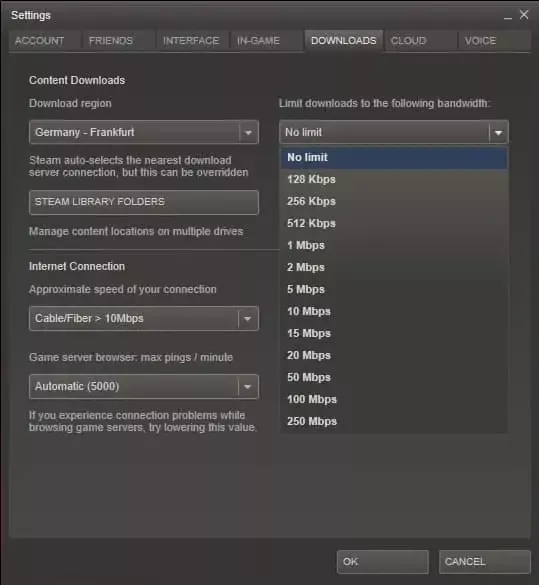
Furthermore, you could select the type of connection that you had and its approximate bandwidth that is available.
In the current Steam client (2022-05-20) the options are a bit more expanded and also restricted. The new client depicted down below now shows a text field where the end user can enter a custom value. The value entered within this box will limit the speed to that amount in KB/s, rather than using a series of presets. This change to me is a welcoming change as this allows for better fine tuning than a preset can offer for varying internet connections.
One thing that needs to be looked after is whether the option to "Display download rates in bits per second" is set as this has an impact on the bandwidth limit set in the options. The first image shows a configuration in MB/s with the second in Mb/s:
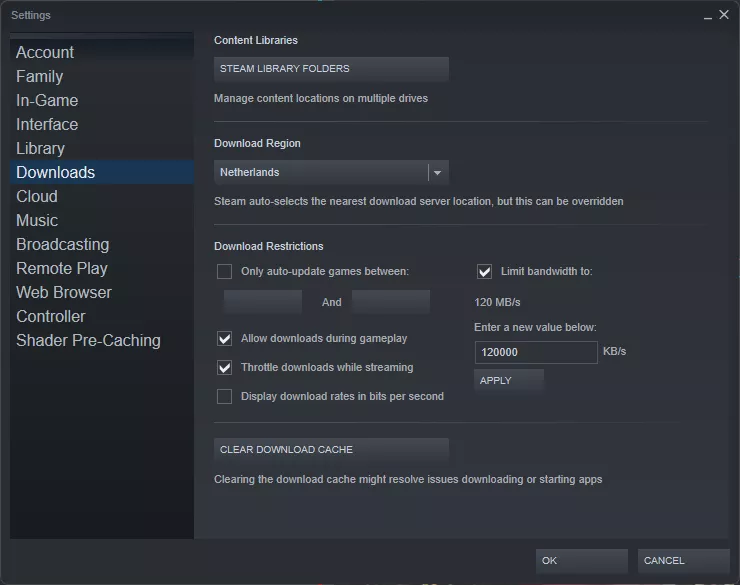
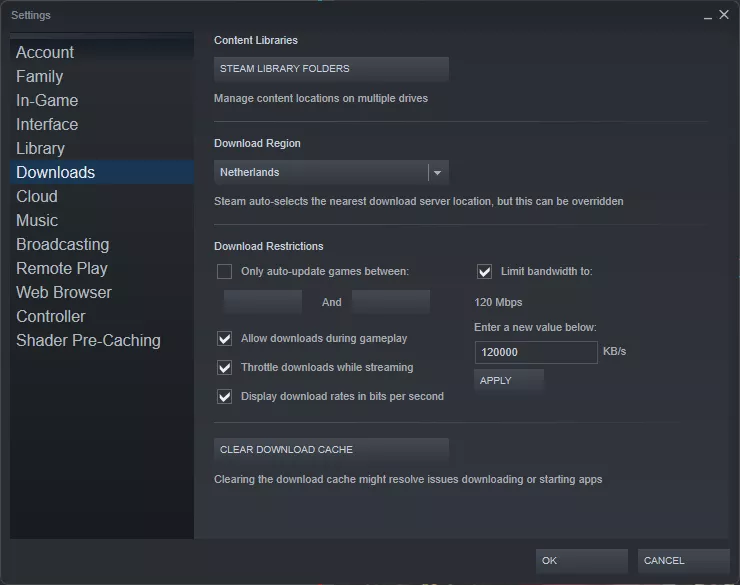
Setting a bandwidth limit of 120 MB/s is about 960 Mb/s, or a gigabit connection, 8 times the amount of the Mb/s filter.
The option to specify the connection type and an approximate speed have been removed, which whilst maybe unfortunate is not horrible to me. The speed approximate is not needed if the user can set the best value by themselves.
Over all, the Steam client is the launcher I have used to most. But I also think it offers the best settings for bandwidth restrictions as it no longer relies on prefixes and allows the user to set the value themselves.
GOG Galaxy
Up next is the launcher made by GOG named Galaxy and acts as a competitor for Steam, offering DRM-free versions of popular and older titles. The company behind the launcher is Polish studio CD Project Red, famous for The Witcher and Cyberpunk 2077. Besides the sale of DRM-free games, the major selling point of Galaxy is that it can connect to other services, including Steam and act as a global hub for all your games.
The Galaxy launcher has existed since 2019 where it was in closed beta, and would be released to the general public on December 18, 2019 as 2.0.12 Beta. The current version of Galaxy is 2.0.50.34 Beta and offers support for bandwidth limitations:
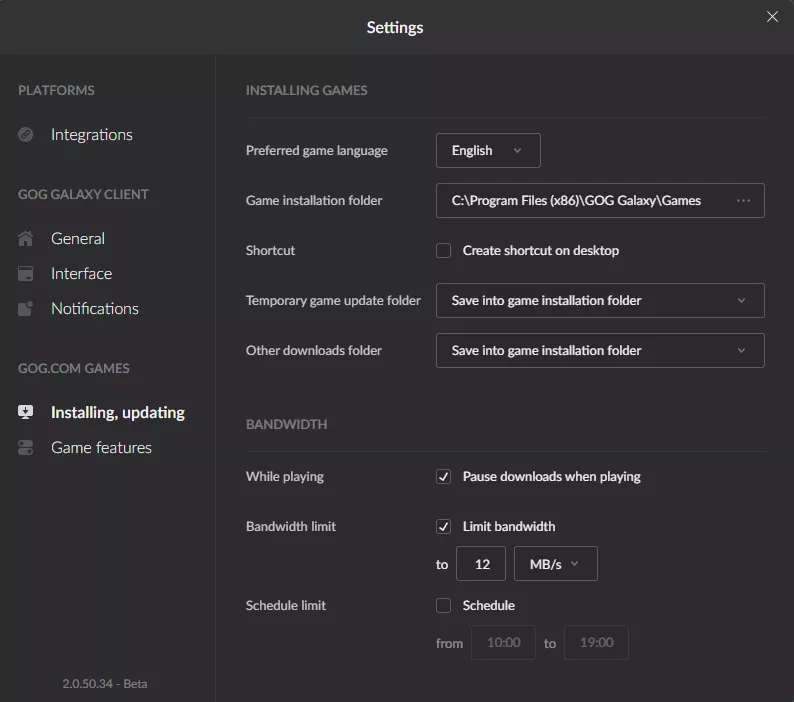
Similar to Steam, Galaxy allows the user to set the bandwidth limit themselves in either MB/s or KB/s; no option for Mbps or Kbps is present which is a bit saddening but better than only presets or not being able to set a limit at all.
Origin
Origin is a launcher that I have never really enjoyed using since my first introduction to it with Battlefield 3, many years ago. The UI was always clunky with items not where I expected them; something that has persisted over time it seems.
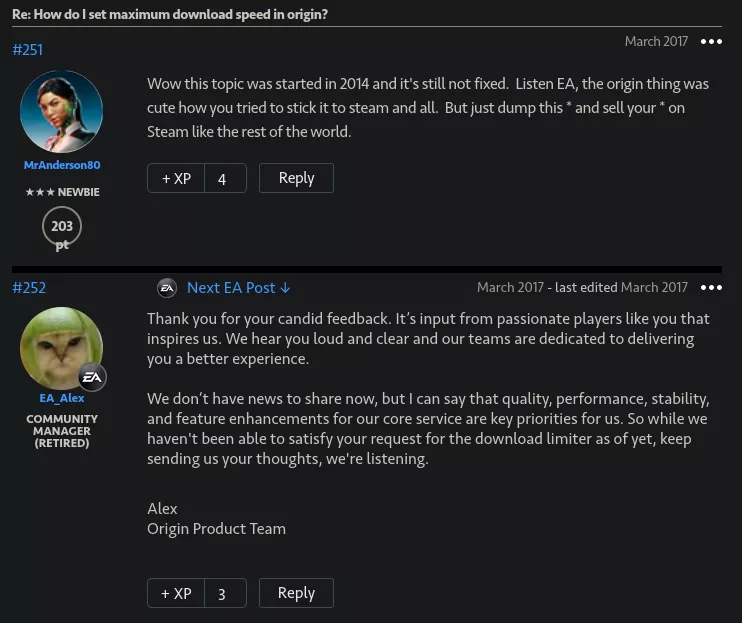
Origin has support for download bandwidth limits since circa 2017, after the community had been asking for it for years on their [EA Answers HQ][ea-answers] page. The thread this community post is referring to contained the following hilarious conversation between a passionate player and a (retired) community manager:
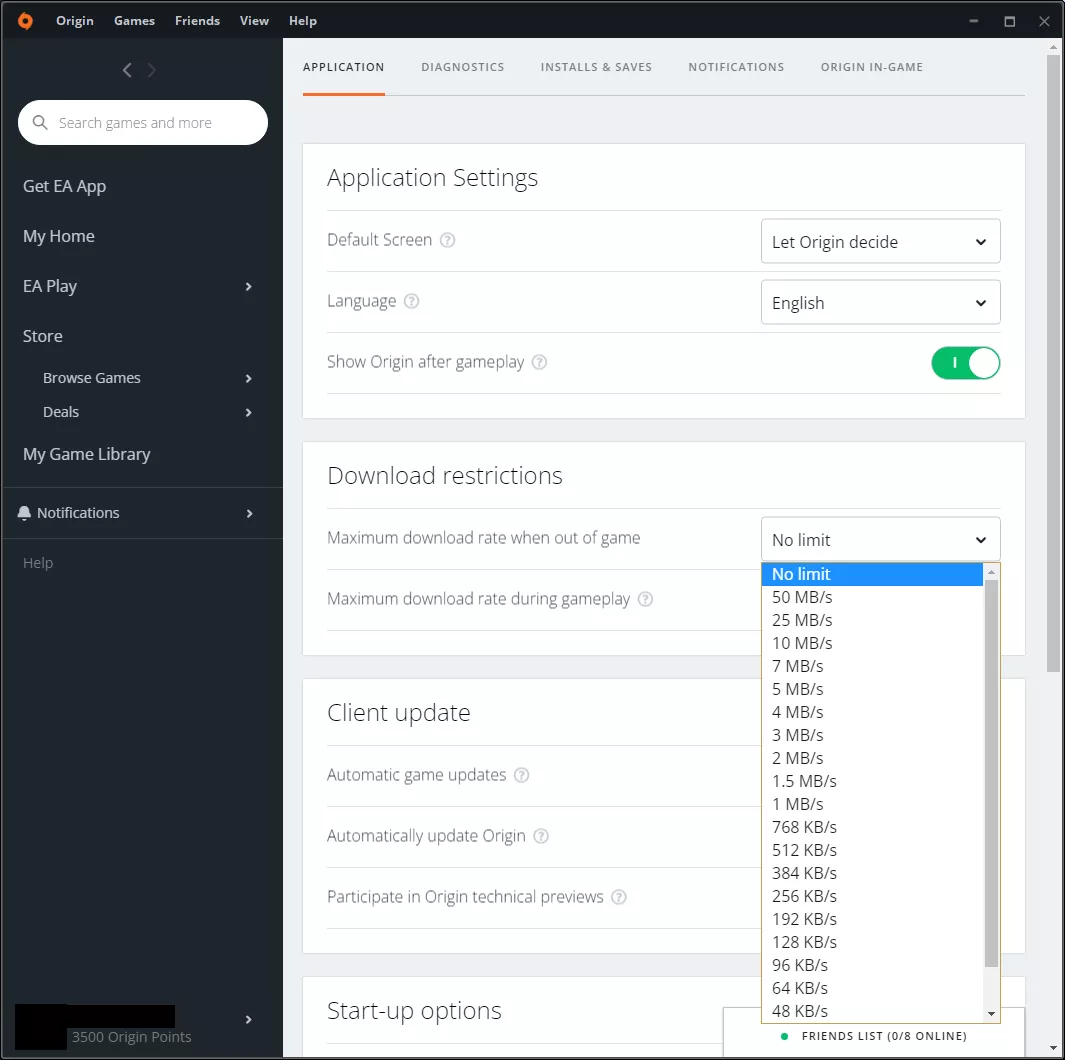
Since the 2017 release EA Origin does support limiting the amount of bandwidth to be used by downloads, albeit only with presets outside and during games. The options given are quite disappointing to me, only going from 16 KB/s up to 50 MB/s or 400 Mb/s.
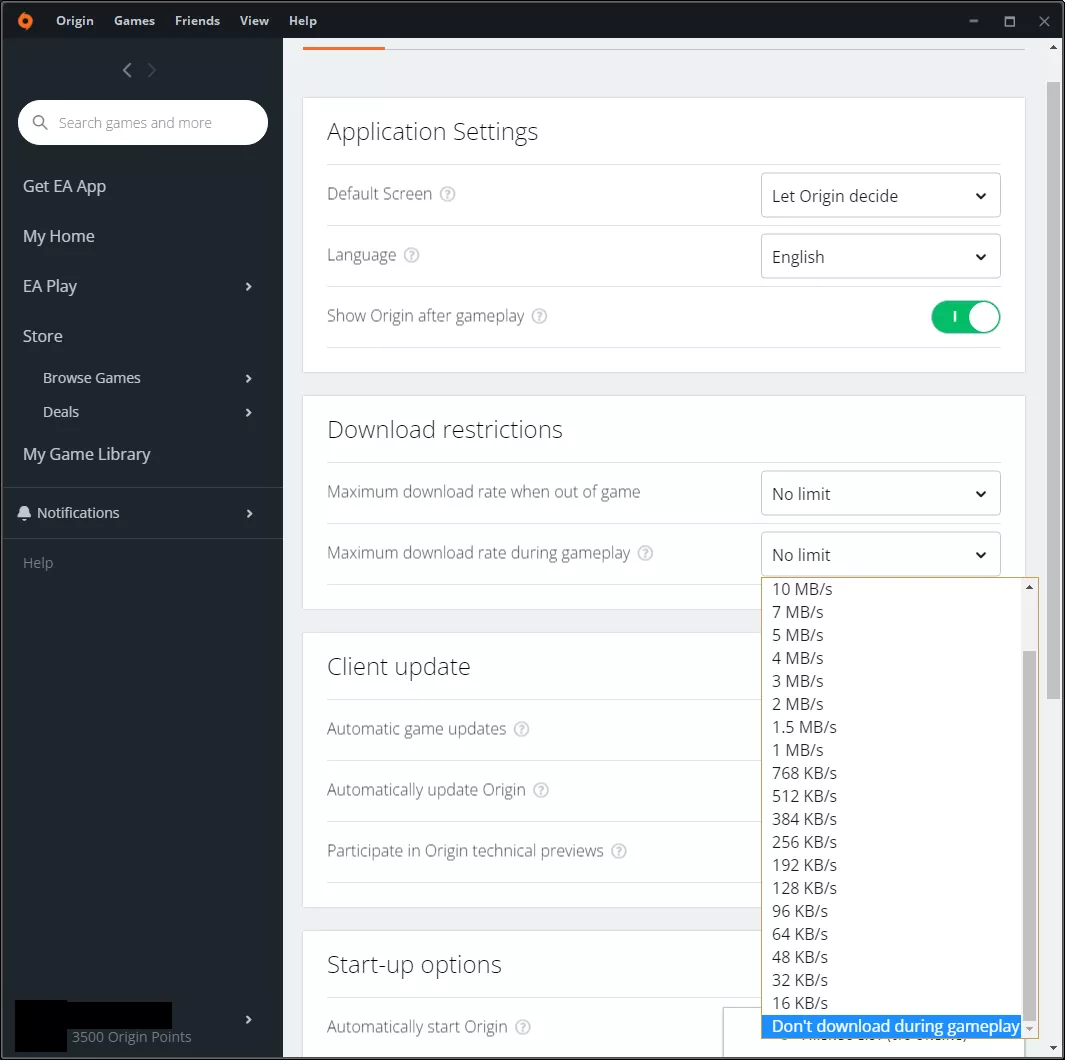
Moreover, the only way to disable downloads whilst playing a game is via the dropdown and selecting "Don't download during gameplay":
Allowing the end-user to set the bandwidth limit would be a better alternative than any preset could offer, but considering it took EA 4 years to implement this I would say that's more than most would have expected in the first place.
Ubisoft Connect
Up next is Uplay, now branded as Connect, is Ubisoft's take on Origin for their own games. However, unlike EA, Ubisoft publishes (most of) their games on Steam as well, and then forces you to use Connect alongside Steam rather than only Connect.
Looking back through the years it appears that Uplay/Connect has been able to set a bandwidth limit since 2016, going by this YouTube video showcasing the available options. The mechanism shown in the video is the exact same as the one that is present now in Connect. This mechanism is sadly a slider that ranges between 0.25 MB/s and 200 MB/s, or 1600 Mb/s, which is a tad bit excessive in my opinion for most connections:
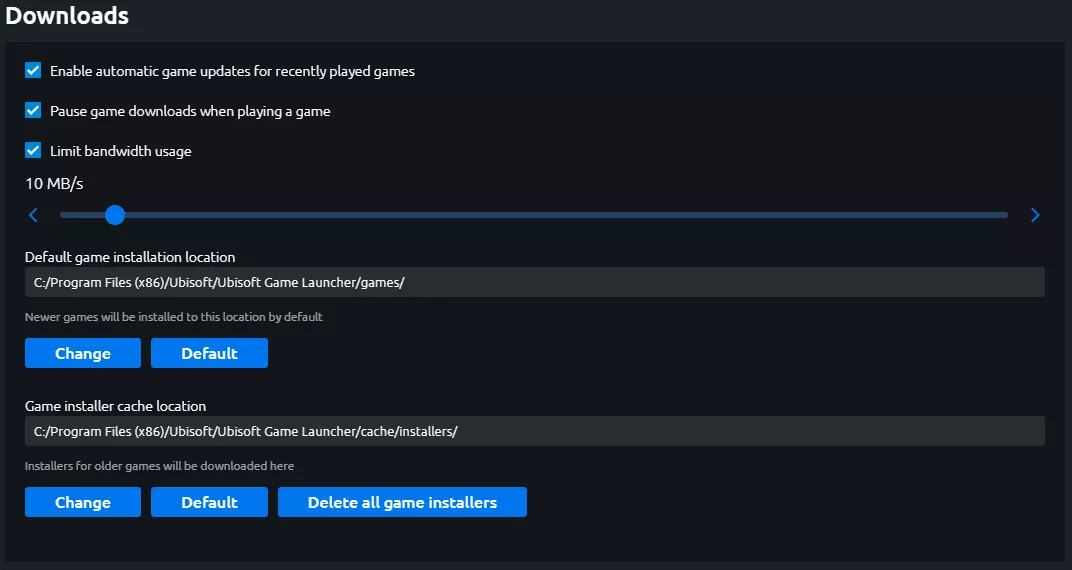
My issue with this slider design is that, whilst it has a wide range of options, it doesn't feel intuitive to use. In my situation with a 180 Mbps connection I would use at most ~22% of the slider. Moreover, setting the value is a nightmarish experience of its own as the currently selected value only updates once the user let's go of the slider to set its position, further smaller adjustments are in 0.25 MB/s increments.
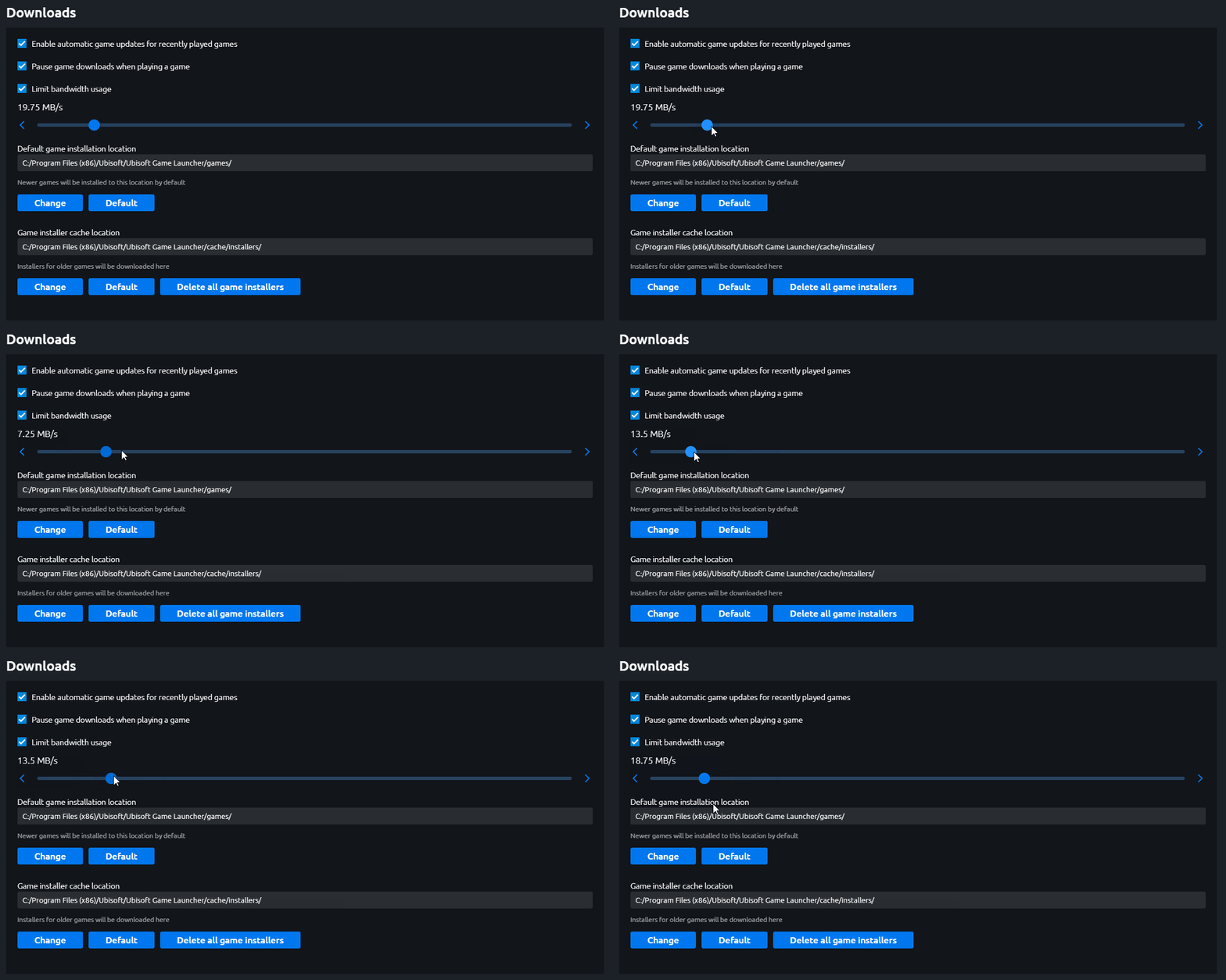
It was this terrible design that even led me to writing a short collection of Tweets regarding the slider, and my discontent with it, that would ultimately get turned into this article:
.@UbisoftSupport Is there a reason to have the download bandwidth limiter set to Megabytes per second, rather than Mega- or kilobits per second?
— Jasper (@Saszper) May 1, 2022
The current scale ranges from 0.25 MB/s to 200MB/s; this is 2 mbps and ~1600 mbps respectively.